Showing posts with label Best Practice. Show all posts

Thursday, September 16, 2021

Power Platform > RETURN TO WORK App

Get back to work after COVID lockdown in a smart & safe manner


Over the past few months I have started getting more involved into the world of Power Platform. I have a natural instinct to learn more about the No-Code Low code solutions that are out there for the citizen developers. Power Platform is a very promising Microsoft offering out there, and being involved heavily in the design, architecture & implementation in Neudesic's RETURN App to get out to MS marketplace I wanted to share it on my personal blogspace to raise awareness in my IT community.

Please reach out to me  pallavi.sharma@neudesic.com to learn more or If you have any questions. More details here

RETURN is part of Neudesic’ s COVID-19 response initiative to deliver new technology-based solutions to help organizations stabilize, adapt, and thrive during the current pandemic times.

The primary goal behind building this accelerator was for internal Neudesic employees and build an IP / accelerator that can be utilized by other companies with minimal effort.


It is an easy to use digital Mobile ready solution that enables employees to support a safe return to their workplace. This solution is built on Power Platform – Namely Power apps and Power Automate. 

More details here


So, why RETURN: Companies can get a head-start with a pre-built framework based on the most current CDC and public health guidance to support a return to the workplace. Some of the value features are listed below for your quick reference:

  • Free and easy to scale on Microsoft PowerApps.
  • Mobile Ready - available over any mobile device, browser and as a mobile app as well.
  • Configurable - Simple to configure workflows to the specific needs of your facilities and business.
  • Accelerator Development - Ability to produce powerful functionality at a fraction of the cost compared to the development of custom code for the same purpose. 
  • Automated Solution - An efficient way to shift away from manual, paper-driven work within HR and other departments.
  • Secure & Efficient - ability to leverage the user’s secure environment from the start, no PII data is hosted by the RETURN framework.
  • Ready to use with minimal config. - facility management, Policies, FAQ's, each screen header text, questions for Health assessment, and Check-in can be easily configured.
  • Robust Real-Life Use cases in MVP since it is going to be used internally by Neudesic.

We are targeting 3 personas here in the RETURN APP

  • Employees who wish to come to the workplace and they will have the ability to reserve workspace for a particular date in that facility
  • Next is the Compliance team is responsible for executing policies, perform check-ins via health screening , send out announcements and manage supplies i.e. masks, Sanitizers etc., per facility.
  • Finally, the Governance Committee or a set of Admins – i.e. HR legal and C-Team responsible for establishing & enforcing the Neudesic Policies as related to COVID-19 

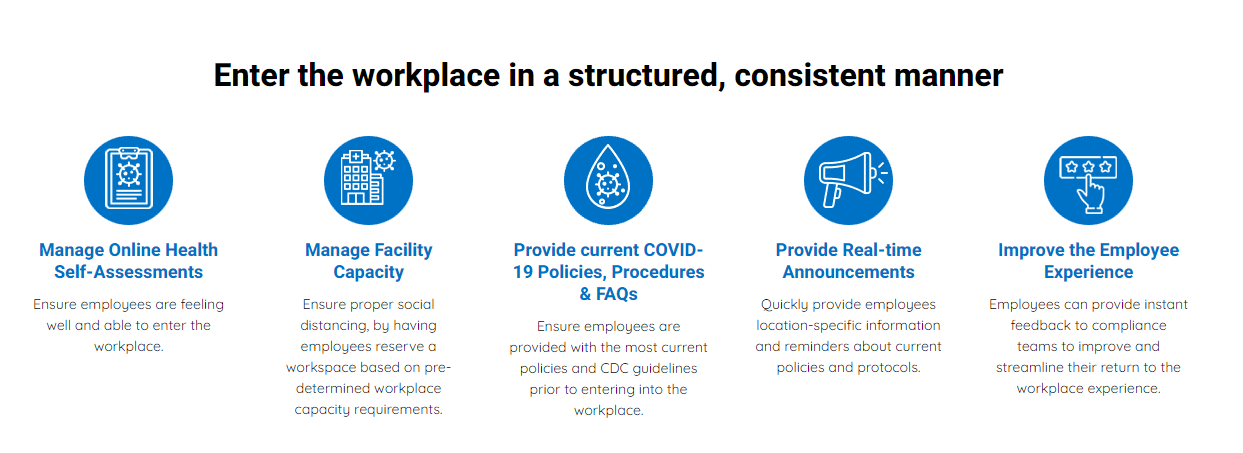
Features Supported:


Watch a quick video! 


Tuesday, January 15, 2013

Performance Matters - SP2010!

I was researching about the performance in SP2010 and got this rich content of some really good to do's and not to do's which I would like to share.

Why Dispose?

Several of the SharePoint Foundation objects, primarily the SPSite class and SPWeb class objects, are created as managed objects. However, these objects use unmanaged code and memory to perform the majority of their work. The managed part of the object is much smaller than the unmanaged part. Because the smaller managed part does not put memory pressure on the garbage collector, the garbage collector does not release the object from memory in a timely manner. The object's use of a large amount of unmanaged memory can cause some of the unusual behaviors described earlier. Calling applications that work with IDisposable objects in SharePoint Foundation must dispose the objects when the applications finish using them. You should not rely on the garbage collector to release them from memory automatically.
 
Do not instantiate an SPWeb, SPSite, SPList, or SPListItem object within an event receiver.

Event receivers that instantiate these objects instead of using the instances passed via the event properties can cause the following issues:
  • Significant additional roundtrips to the database (one write operation can result in up to five additional roundtrips in each event receiver).
  • Calls to the Update method on these instances can cause subsequent Update calls in other registered event receivers to fail.
If you do not retrieve SPWeb, SPSite, SPList, or SPListItem objects from SPItemEventProperties and instead instantiate those objects within an event receiver, when you call Update on the new instances, you must clear it with the Invalidate method in the appropriate child class of SPEventPropertiesBase (for example, SPItemEventProperties.InvalidateListItem or SPItemEventProperties.InvalidateWeb).

Avoid creating and destroying objects unnecessarily in code, as this may require that extra queries be made against the database and may even involve code that is incorrect.

To return a single item from a collection, always use a Get* method when one is provided through a parent object, instead of iterating through the entire collection and using an indexer. For example, the SPWeb class provides GetFile, GetFolder, and GetListItem methods that you can use to return single items.


An SPWeb or SPSite object can occupy a lot of memory.

Avoid constructing objects of these types simply to get a reference to a parent object. Instead, to get a reference to a web application, use the static SPWebApplication.Lookup(Uri) method, and pass it a Uri object that is created with the URI of the web application. You can then get a reference to the farm by using the Farm property of the web application object. (You can get a reference to a remote farm by using the static Open(String) method.) The ContentDatabases property of the web application object contains a collection of the content databases in the web application. You can get a reference to a particular content database through this property if you know its index in the collection

 
Microsoft SharePoint Foundation 2010 and Microsoft SharePoint Server 2010 apply a default query threshold of 5,000 items. Any custom code that relies on query result sets that can exceed this maximum will not perform as expected. Queries on lists consisting of more than 5,000 items that include fields that are not indexed in their query conditions will also fail, because those queries must scan all rows in a list.
 

Do not use SPList.Items

SPList.Items selects all items from all subfolders, including all fields in the list. Use the following alternatives for each use case.
  • Adding an item
    Instead of calling SPList.Items.Add, use SPList.AddItem.
  • Retrieving all items in a list
    Instead of using SPList.Items, use SPList.GetItems(SPQuery query) . Apply filters, if appropriate, and specify only the fields you need to make the query more efficient. If the list contains more than 2,000 items, paginate the list in increments of no more than 2,000 items. The following code example shows how to paginate a large list.
  • Getting items by identifier
    Instead of using SPList.Items.GetItemById, use SPList.GetItemById(int id, string field1, params string[] fields). Specify the item identifier and the field that you want.
  • Do not enumerate entire SPList.Items collections or SPFolder.Files collections.
    The left column in Table 1 lists the methods and properties that if used will enumerate the entire SPList.Items collection, and cause poor performance and throttling for large lists. Instead, use the better-performing alternatives listed in the right column

  • Alternatives to enumerate SPList.Items

     
    Poor Performing Methods and Properties Better Performing Alternatives
    SPList.Items.XmlDataSchema Create an SPQuery object to retrieve only the items you want.
    SPList.Items.NumberOfFields Create an SPQuery object (specifying the ViewFields) to retrieve only the items you want.
    SPList.Items[System.Guid]  SPList.GetItemByUniqueId(System.Guid) 
    SPList.Items[System.Int32]  SPList.GetItemById(System.Int32) 
    SPList.Items.GetItemById(System.Int32)  SPList.GetItemById(System.Int32) 
    SPList.Items.ReorderItems(System.Boolean[],System.Int32[],System.Int32)  Perform a paged query by using SPQuery and reorder the items within each page.
    SPList.Items.ListItemCollectionPosition ContentIterator.ProcessListItems(SPList, ContentIterator.ItemProcessor, ContentIterator.ItemProcessorErrorCallout) (Microsoft SharePoint Server 2010 only)
    SPList.Items.ListItemCollectionPosition ContentIterator.ProcessListItems(SPList, ContentIterator.ItemProcessor, ContentIterator.ItemProcessorErrorCallout) (SharePoint Server 2010 only)
     
     
    Using the SPList.ItemCount property is the recommended way to retrieve the number of items in a list. As a side effect of tuning this property for performance, however, the property can occasionally return unexpected results. For example, if you require the exact number of items, you should use the poorer performing GetItems(SPQuery query), as shown in the preceding code example.
     
    Whenever possible, acquire a reference to a list by using the list's GUID or URL as a key.

    Alternatives to SPFolders.Files

    Poor Performing Methods and PropertiesBetter Performing Alternatives
    SPFolder.Files.Count SPFolder.ItemCount
    SPFolder.Files.GetEnumerator() ContentIterator.ProcessFilesInFolder(SPFolder, System.Boolean, ContentIterator.FileProcessor, ContentIterator.FileProcessorErrorCallout) (SharePoint Server 2010 only)
    SPFolder.Files[System.String] ContentIterator.GetFileInFolder(SPFolder, System.String)Alternatively, SPFolder.ParentWeb.GetFile(SPUrlUtility.CombineUrl(SPFolder.Url, System.String) (SharePoint Server 2010 only)
    SPFolder.Files[System.Int32] Do not use. Switch to ContentIterator.ProcessFilesInFolder and count items during iteration. (SharePoint Server 2010 only)


    Monday, July 30, 2012

    Migrating File store to SP2010 ECM considerations

    Migration Considerations


    During the planning process of a migration, decisions should be made early as to whether content is migrated directly into SharePoint 2010 "as - is" or whether this opportunity should be explored to make any changes to the information architecture, archiving, or look and feel and address the pain points. Since, making changes to any of these areas can complicate the migration process, some organizations choose to focus simply on migrating the content to SharePoint 2010, and then enhancing the other aspects of content are pushed to the later phases of the project. Simplifying the migration can help to reduce the coefficient of risk by substantially reducing the number of variables & at the same time reorganizing the content and make minor changes to the look and feel of may go a long way in driving adoption.
    Other organizations choose to take the opportunity of the migration to organize their content in a better way at the same time as it is moved into SharePoint 2010. This may involve updating the information architecture, revamping security, implementing archiving, storage optimization and retention policies, or consolidating and reorganizing the content.

     
    If the migration is a Sharepoint to sharepoint migration, adoption is less of an issue later, since the users are already used to a certain way of accessing files which is not drastically changeing after the upgrade process.

    However, if this is a File server to SharePoint migration we need to be careful since the access and process of using the file has changed somewhat and there is a learning curve required by the end user to successfully use the document management features to be most productive.

    From my experience, here's a list of supporting points to use  the document management :
    • Document Library :
      Document Library is a List template used to create a repository of documents to be accessed by the users. This is one of the parts of a site which has other tools available for collaboration. A document library  is a specialized list with functionality tailored to managing
      documents.
    • Document Workspace:
      This should be used when there is a team that wants to collaborate on a few documents  say < 5,000 or so. This serves the purpose without the overhead of maintenance and storage. A workspace is a specialized type of site with functionality tailored around either a single document (a document workspace) or a scheduled meeting (a meeting workspace).
    • Document Center:
      This is a site template dedicated to manage a large volume of active & changing documents. Any time a document can be declared as a record by either moving it to a Record Center or declaring the document as a record in same document library using the in-place feature.The Document Center site template supports creating knowledge base archives. Typically, knowledge bases contain single versions of documents, and a site can scale to 10 million files. In a typical scenario, such as a technical support center for a large organization, 10,000 users might access the content, primarily to read it. A subset of 3,000 to 4,000 users might upload new content to the site
    • Record Center :
      This is a site template specifically dedicated for managing large volume of records (documents that are not modified),Tens of millions of records in a single Records Center, Hundreds of millions of records in a distributed archive: This is an effective place for Hierarchy, Driven By Metadata 
         Here are some of the major features:
      • Document ID: Every document can be assigned a unique identifier, which stays with the document even when it's archived. This allows records to be easily referenced by an ID no matter where the document moves.
      • Multi-Stage Retention: Retention policies can have multiple stages, allowing you to specify the entire document life cycle as one policy (e.g. review Contracts every year, and delete after 7 years)
      • Per-Item Audit Reports: You can generate a customized audit report about an individual record.
      • Hierarchical File Plans: You can create deep, hierarchical folder structures and manage retention at each folder in the hierarchy (or inherit from parent folders).
      • File Plan Report: You can generate status reports showing the number of items in each stage of the file plan, along with a roll up of the retention policies on each node in the plan.
      • Taxonomy and Centralized Content Types: The archive will be a consumer of enterprise-wide taxonomies and content types, ensuring consistency and context transfer between the collaborative spaces and the archive. We'll be talking a lot more about our 2010 taxonomy investments in future posts.
      • Content Organizer: The records router can use meta data to route incoming documents to the right place in the hierarchical file plan. For instance, it enables you to automatically enforce rules on content that is submitted, like "If a Purchase Agreement is tagged with Project Alpha, send to the Alpha Contracts sub folder and apply that's folder retention policy to the item."
      • Virtual Folders: The file plan is a great way to manage a repository but often time isn't what you want to use to navigate and find the content you are looking for. The SharePoint 2010 Records Center makes use of a new feature called meta data based navigation, which allows you to expose key meta data as virtual folders:

    Wednesday, July 18, 2012

    Best Practices.. Sharepoint

    A collection of all best practices for SharePoint is collated below logically grouped :


    General:


    Code :


    Customizations:


    Usage :


    Design and Architecture:


    Migration:


    Security: